
“Where do I start automating?”: Small business workflow automation
Did you know that cloud services like your email, your data storage, and more, only happen because of automation? It’s what makes the cloud. Without automation, the cloud wouldn’t be economically viable. It’s no wonder then that automation can transform businesses of any size. The biggest problem is starting. It’s like writer’s block, but instead of a blank page, pens, and pencils, you’re staring at an interface on your PC with a bunch of commands. Where on earth do you start?
“The saddest thing in the world”
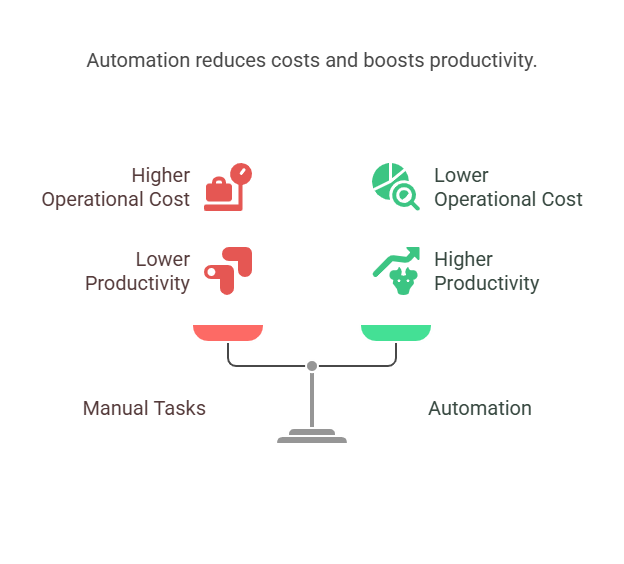
An automation expert once said that the saddest thing in the world was watching people use time and effort on manual processes that could easily be automated. Repetitive manual tasks can waste hours per week, days per month, … you get the picture. Worse still, you can’t scale those tasks unless you bring in more people, with profitability taking a nosedive. Yet another reason why the cloud, scalable, flexible, adaptable, and profitable, relies so heavily on automation.
Where to start putting things right
There are two aspects here. First, look at processes that currently take time or are prone to errors. You may be able to automate parts of these processes to solve time and error problems easily. Second, try out some of the simplest automation possibilities for yourself, like recording a script that automatically sets up the template to use for your weekly reports. Don’t be fooled by their simplicity: these are among the best automation tools for small businesses. The trick is to get started with something small which will then channel your thinking towards other workflows to be automated and benefits to be gained.
Best automation tools for small businesses
You may already have them. Automation can be very simple, very affordable (as in free), and very accessible. If you use office software from Microsoft (Excel, Word, for example) or from Google (Sheets, Docs, cloud applications to boot!), easy-to-record automation possibilities are built-in. Depending on your requirements, you might opt for one or more of the following:
- Simple, repetitive actions in office software for small business workflow automation >> use Microsoft or Google built-in automation (macros)
- More complex automations across several apps in the same group of apps >> for example, use Google Apps Scripts for Google Workspace apps, or Microsoft Power Automate for Microsoft Office apps
- Connecting with other popular web apps >> Zapier and IFTTT offer simple trigger and action options
- More sophisticated workflows >> look into Make.com for possibilities, for example
As your needs become more advanced, you may need to acquire some specialist knowledge, get external help, or use the secret weapon described below*.
An immediate hack for tangible results
It’s likely that you use productivity apps for word processing, spreadsheet calculations, or slide presentations. It’s also likely that you have repetitive tasks to accomplish, like formatting text in a certain way, producing daily or weekly reports, or converting sales figures into presentations. And there’s a good chance you use Google or Microsoft apps. So, start saving time by using the macro record possibilities for small business workflow automation.
Basically, you click the record button, do the actions you want to automate, and click the record button to save what you just recorded as a macro. When you want those actions to run again by themselves as an automation, click on the macro. Then use the time you just reclaimed to do something more valuable for your business, like a new strategy to catapult your business to stardom in your market.
FAQs on small business workflow automation
- Can I do this myself? For macro recordings for word processing and spreadsheets, absolutely. For more advanced automation, you can try the no-code (no programming knowledge needed) options offered by different solution providers.
- What’s the secret weapon you mention above? It’s an artificial intelligence (AI) platform like Copilot from Microsoft or Gemini from Google. Ask them a question like “How can I automate this process” (describe your process). The platform will then describe options. For macros for Excel or Sheets, etc., it will often offer the script ready-made for you to copy, paste, and run.
- Will automation replace employees? Automation can free up employees for more valuable tasks, rather than replace them. Human connection, critical analysis, and creative thinking are a few examples of where employees can shine once they are liberated from manual, repetitive work.
- Tell me again, where do I start? For small business workflow automation, look for activities that follow the same steps, repeatedly, and frequently. They are often the simplest to automate with the biggest savings in time and effort. Boring, monotonous tasks are good targets as well because they are more prone to human error. Automating these can cure repeated problems as well.
Next steps for small business workflow automation
Do it! Ideally, you’ll find high-impact, low-effort opportunities for automation. If these aren’t immediately obvious, don’t sweat it. Try a few macros as described above and magically those opportunities will start to show themselves.